Step by Step
|
|
|
Precondition: You can access a corporate directory via LAN.
|

|
Select the Corporate tab.
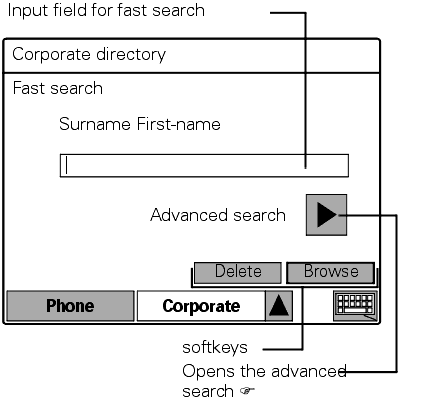
The corporate directory opens:
|


|
Enter the name you want or just the initial letters (Entering characters  ), or use wildcards " * ". ), or use wildcards " * ".
|
if necessary 
|
Delete the letters to the left of the cursor one by one.
|

|
Start the search.
"Searching" appears in the top right of the display when the search is running. The search can be interrupted at any time with "Cancel".
Dialing a call number:
|
if necessary

|
If there is more than one suitable entry/name, select the entry you want (reverse-video).
|

|
Click on the softkey. The call numbers entered for the name are displayed.
|

|
Click on the softkey beside the call number you want.
The display changes to "Phone" .
The following softkeys are available:
|
1x or 2x

|
The default status is active for the corporate directory.
|

|
On page 1 of 2 only: Display the second page of an entry's detailed information. The softkey changes to "Previous".
|

|
On page 2 of 2 only: Display the first page of an entry's detailed information. The softkey changes to "Next".
|